Disk Table Configuration
Columns
You can configure which columns are shown by the disk table widget by setting the columns setting:
[disk]
# Pick which columns you want to use in any order.
columns = ["Disk", "Mount", "Used", "Free", "Total", "Used%", "R/s", "W/s"]
Default Sort Column
You can customize the default sort column (by default, it sorts by disk name in ascending order). For example, to sort by the read rate:
[disk]
default_sort = "R/s"
You can use any valid column name here (e.g. "Disk", "Mount", etc.). Note that if you put a column name that is not actually used, the default sort will just be the first column shown.
You can also set the sort order by changing disk.sort_order with "Ascending" or "Descending". Defaults to
"Ascending":
[disk]
sort_order = "Ascending"
Using Binary Prefixes
Disk space uses decimal prefixes (e.g. KB, MB, GB, TB) by default. To display using binary prefixes instead
(e.g. KiB, MiB, GiB, TiB), enable use_binary_prefix:
[disk]
use_binary_prefix = true
Show Unmounted Devices (Linux only)
By default, only mounted devices are shown. To also show unmounted devices on Linux, enable include_unmounted:
[disk]
include_unmounted = true
Unmounted devices show I/O activity but have no used/free space (those require a live mount), so those
columns appear as N/A. Pseudo-devices (loop*, ram*, zram*) are skipped, and you can hide other
noisy devices with the name filter.
Filtering Entries
You can filter out what entries to show by configuring [disk.name_filter] and [disk.mount_filter] to filter by name and mount point respectively. In particular,
you can set a list of things to filter with by setting list, and configure how that list
is processed with the other options.
For example, consider a disk widget showing these entries:
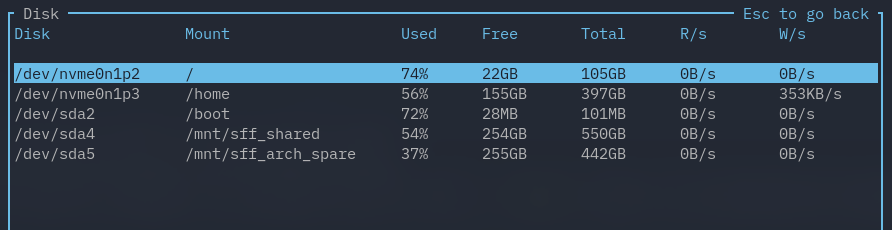
If we wanted to ignoring any entry with a name that matches /dev/sda:
[disk.name_filter]
# Whether to ignore any matches. Defaults to true.
is_list_ignored = true

# A list of filters to try and match.
list = ["/dev/sda"]

# Whether to use regex. Defaults to false.
regex = true

# Whether to be case-sensitive. Defaults to false.
case_sensitive = false

# Whether to require matching the whole word. Defaults to false.
whole_word = false
This would give us:

We can also combine both the name filter and mount filter. For example:
[disk.name_filter]
is_list_ignored = false
list = ["/dev/sda"]
regex = true
case_sensitive = false
whole_word = false

[disk.mount_filter]
is_list_ignored = true
list = ["/mnt/.*", "/"]
regex = true
case_sensitive = false
whole_word = true
This gives us:
